
Many business owners approach us with a common complaint: their website has been redesigned, it looks more modern, but conversion rates haven't budged. Contact forms remain empty, and visitors still leave on the first page.
The problem isn't the appearance; it lies in the experience visitors have while navigating the website.
This is where the distinction between UI design and UX design becomes apparent, moving beyond mere technical jargon used by agency professionals.
What is UI Design?
UI stands for User Interface. UI design is the process of designing all visual elements that users see and interact with on a website or application.
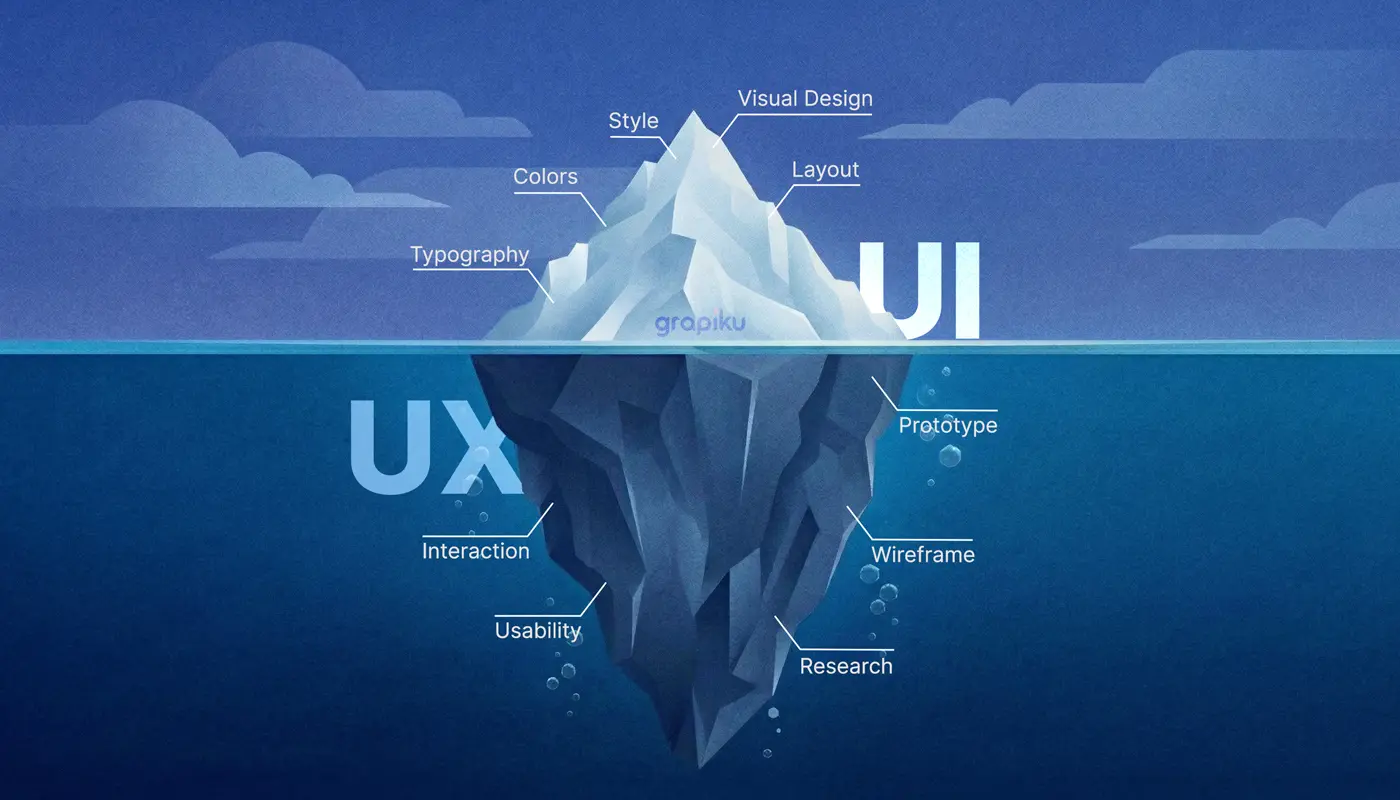
A UI designer focuses on elements such as:
Color selection, typography, and iconography
Page layout and visual hierarchy
Design of buttons, forms, cards, and interactive components
Visual consistency across all pages
Animations and microinteractions
In short, UI answers the question, "Does this digital product look good and feel comfortable to interact with?"
What is UX Design?
UX stands for User Experience. UX design is a broader process, encompassing not just the appearance, but the entire user journey from the moment they first open a page until they complete their goal, such as filling out a form, making a purchase, or contacting the sales team.
A UX designer focuses on aspects like:
User research and behavior analysis
User flow and information architecture
Wireframes and low-fidelity prototypes
Usability testing
Workflow optimization based on data
From Grapiku's experience:
UX answers a deeper question: "Can users achieve their goals easily and without frustration?"
Concrete Differences Between UI and UX Design
The easiest way to understand this distinction is through a real-world example.
Imagine a B2B logistics company's website. It has a clean appearance, professional colors, and neat fonts. However, when a prospective client attempts to request a price quote, they must navigate six different steps, fill out 14 fields, and receive no confirmation after submission.
Three days pass without a response, and that client never returns.
The UI is good, but the UX is a complete failure.
This is often overlooked: these two aspects have distinct responsibilities, yet they are interdependent.
Aspect | UI Design | UX Design |
Focus | Visual appearance | User experience |
Output | Mockups, style guides | Wireframes, user flows |
Tools | Figma, Adobe XD | Figma, Maze, Hotjar |
Question | “Does it look good?” | “Is it easy to use?” |
Process | After UX is complete | Before UI begins |
Who Handles Each Role?
UI designers and UX designers are distinct roles, although in many smaller agencies, a single individual, often called a UI/UX designer, handles both.
Primary tasks of a UI designer:
They create consistent, brand-aligned visual designs, producing design systems, reusable components, and high-fidelity mockups ready for developer handover.
Primary tasks of a UX designer:
These professionals ensure the product flow makes sense from the user's perspective, conducting user interviews, creating user journey maps, and testing prototypes before a single line of code is written.
It is crucial for businesses to understand that the work order cannot be reversed: UX must be completed before UI begins. If the process is inverted, you might create something visually appealing but fundamentally flawed.
Why Should Businesses Care About This Distinction?
There's a concrete reason why enterprise businesses are increasingly serious about separating these two roles.
According to Forrester research, every dollar invested in UX yields an average return of $100, representing a remarkable 9,900% ROI. (Source: Eficode)
These figures aren't just relevant for e-commerce. For B2B businesses, such as distribution companies, manufacturers, or professional service providers, poor website UX translates to:
Prospective clients cannot find the information they need
Contact forms or demo requests are not completed
Sales teams receive unqualified leads due to undirected user flows
Brand reputation appears unprofessional to decision-makers
This is where the problem lies.
Many businesses only realize this after spending tens of millions on building websites that look good but fail to generate results.
Case Study: When UI and UX Are Managed Together
When developing the website for Altius Hospitals, we couldn't solely focus on aesthetics. Hospitals represent high-stress environments for users: patients seeking treatment information, families needing emergency contacts, and prospective specialist doctors evaluating institutional reputation.
UX took precedence. We mapped out three primary personas, identified critical information to be placed above the fold, and streamlined navigation from seven main menus to four.
Only after the information architecture was finalized did UI work begin, selecting a color palette that conveyed calm and trust, typography easily readable by seniors, and intuitive icons for less tech-savvy users.
The result was not just a beautiful website, but one that was strategically functional.
A similar example occurred during the revamp project for EON Chemicals' industrial client segment. The primary visitors were procurement manager and technical engineers, not typical consumers. UX helped us determine that product pages should display technical specifications directly, rather than hiding them in downloadable PDFs.
Collaboration Process of UI and UX in Real Projects
In practice, a good website design process unfolds as follows:
Discovery and research (UX)
The UX team understands the client's business, competitors, and target user behavior. Outputs include a brief and user personas.
Information architecture (UX)
This involves defining page structure, navigation, and content hierarchy. Outputs include a sitemap and wireframes.
Prototyping and testing (UX)
Prototypes are created to test the flow before visual design investment begins. The output is a validated prototype.
Visual design (UI)
At this stage, visual elements like colors, typography, and components are developed. Outputs include mockups and a design system.
Developer handover
The UI design is handed over to developers with complete specifications. The output is a website ready for development.
However, in many unstructured projects, stages 1-3 are often skipped. Clients immediately request mockups, and developers proceed directly to coding. The result is a website that looks good but fails to perform for the business.
Time to Optimize UI/UX for Maximum Results
UI and UX are not two aspects that can be optimized separately; they are like two sides of the same business decision.
Investing in both is not an additional expenditure; it's a decision that directly impacts the number of leads your website generates, how professional your business appears to potential clients, and how efficiently your sales team can operate from existing traffic.
If your website feels outdated, or you're unsure whether the issue lies with visuals or the user flow, Grapiku can help conduct a UI/UX evaluation, from a light audit to a comprehensive redesign. View our website design services for further discussion.
- Can UI and UX be handled by one person?
- Yes, and many designers with the title "UI/UX designer" handle both. However, for complex enterprise projects, separating these two roles yields better quality because the focus of each specialization is sharper.
- Which is more important, UI or UX?
- Both are equally important and inseparable. UX without good UI will appear unprofessional and untrustworthy. UI without good UX will be beautiful but confusing. Serious businesses need both.
- Does my website need a UX audit before a redesign?
- It is highly recommended. Redesigning without a UX audit is like repainting a house without inspecting its structure; you might be covering up more fundamental problems.
- How long does the UX process take before moving to visual design?
- It depends on the project's complexity. For a company website, the UX process typically takes 2-4 weeks, including research, wireframing, and one round of testing. This is a very worthwhile time investment before moving into production.
- Does a UX change always require a total visual redesign?
- Not always. Sometimes UX issues can be resolved by altering the flow, reorganizing content, or improving button copy without changing the visual appearance at all.
- How can I tell if my website has UI and UX issues?
- If visitors complain about a dull or outdated appearance, that's a UI problem. If they don't know where to go, or a specific process feels cumbersome, that's a UX issue. Often, both problems emerge simultaneously.
- What is the difference between a wireframe and a mockup?
- A wireframe is a sketch of the page flow and structure, typically in black and white, without visual elements. A mockup is a complete visual version that reflects the final appearance. Wireframes are created by UX designers, while mockups are created by UI designers.